How to Track Camera Prices at B&H Photo Video
Start with the exact B&H listing you want to buy. Copy its product link, check its recorded price history, then set an alert for a price you would be happy to pay. Here is how to do it using the Nikon Z8 as an example.
1. Match the exact camera or lens
Choose the body, lens mount, kit, and condition you want before you compare prices. The Nikon Z8 body at B&H is listing 1765622. If you also want the Z8 with a lens, save that kit as a separate item so you can compare the cost of the complete setup.
2. Use recorded prices to choose a target
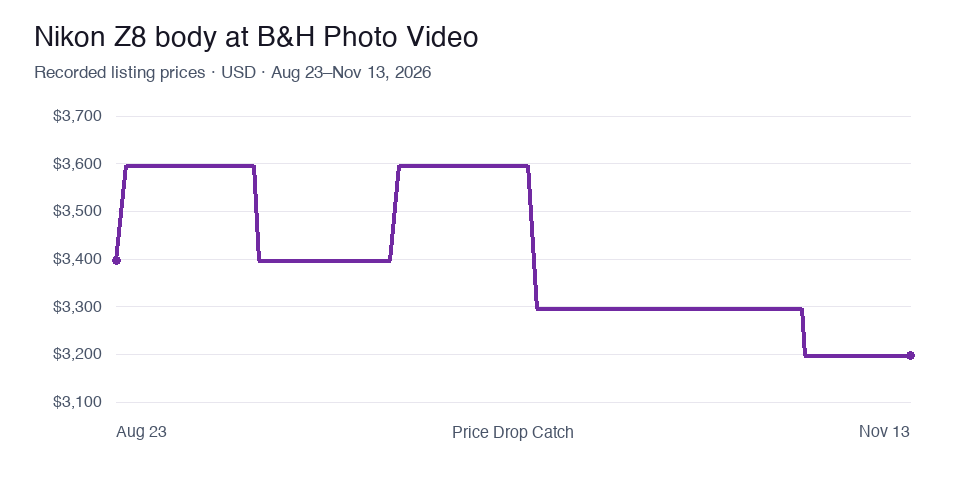
On the Nikon Z8 price history page, compare the latest observation with the recorded low and the typical price. In the snapshot through November 13, 2026, the body had a recorded low of $3,196.95 and a 90-day median of $3,296.95. If your budget for the body is $3,200, that is a reasonable example of an alert target informed by the observed range. Check the live history page for newer observations and confirm the price at B&H before buying.
3. Set up an email alert
- Copy the camera or lens product URL from B&H.
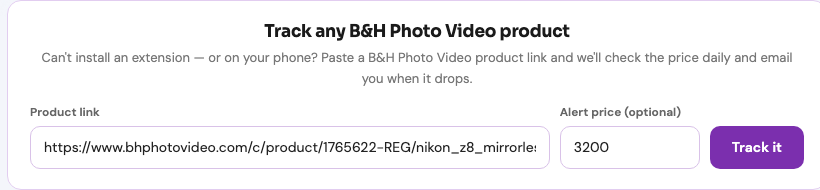
- Open the B&H price tracker and paste the URL into Product link.
- Enter the amount you want to pay in Alert price (optional), then select Track it. Sign in to Price Drop Catch if prompted.
- Open your watchlist to confirm that the right listing is saved. For a newly tracked listing, the first price can take time to appear.
If you are already looking at the Nikon Z8 chart, use Watch this product on that page to save the same listing. You can also use the iPhone app or a browser extension from the B&H tracker page.
Planning a camera purchase for Black Friday?
Save the body and any lenses you are considering ahead of the event. When you see a discount, compare the exact kit and condition against your watchlist, then check shipping and the checkout total. See the Black Friday and Cyber Monday preparation guide and the B&H holiday price picks for the next steps.